
Ratchet: query your external databases from Protokol
Ratchet connects MySQL, PostgreSQL, MongoDB and BigQuery to your project and runs saved, parameterized queries from workflows, functions or the SDK.
Not all of your data lives in Protokol. A MySQL database run by another team, a MongoDB cluster behind an older product, a BigQuery dataset used for reporting: you often need to read from them, or write to them, without moving the data first.
Ratchet connects external databases to your project and lets you run predefined, parameterized queries against them. You find it in the dashboard under Developer › Ratchet. You call the same queries from workflows, functions or the SDK.
What Ratchet supports
| Database | Connection type | TLS |
|---|---|---|
| MySQL | DSN | Recommended |
| PostgreSQL | DSN | Recommended |
| MongoDB | Connection URI | Recommended |
| BigQuery | Service Account JSON | N/A |
A connection holds the credentials for one database. Each connection holds a set of queries: saved expressions that you reference by name when you run them.
Connecting a database
1. Allow Protokol through your firewall
Ratchet connects to your database from Protokol's servers. All Ratchet connections leave from a single fixed IP address that does not change, and it is the same in every environment. The Ratchet documentation lists the address and shows how to allow it on DigitalOcean, AWS RDS, Google Cloud SQL and self-hosted servers (ufw and iptables).
2. Create a dedicated database user
Create a separate user for Ratchet with limited permissions. For most uses, make it read-only:
CREATE USER 'protokol_ratchet'@'%' IDENTIFIED BY '<strong-password>';
GRANT SELECT ON your_database.* TO 'protokol_ratchet'@'%';
If your queries need to write, grant INSERT, UPDATE and DELETE as well. MongoDB works the same way, with the read or readWrite role.
3. Configure the connection
MySQL expects a specific DSN format, not a mysql:// URI:
user:password@tcp(hostname:port)/database_name?tls=true&parseTime=true
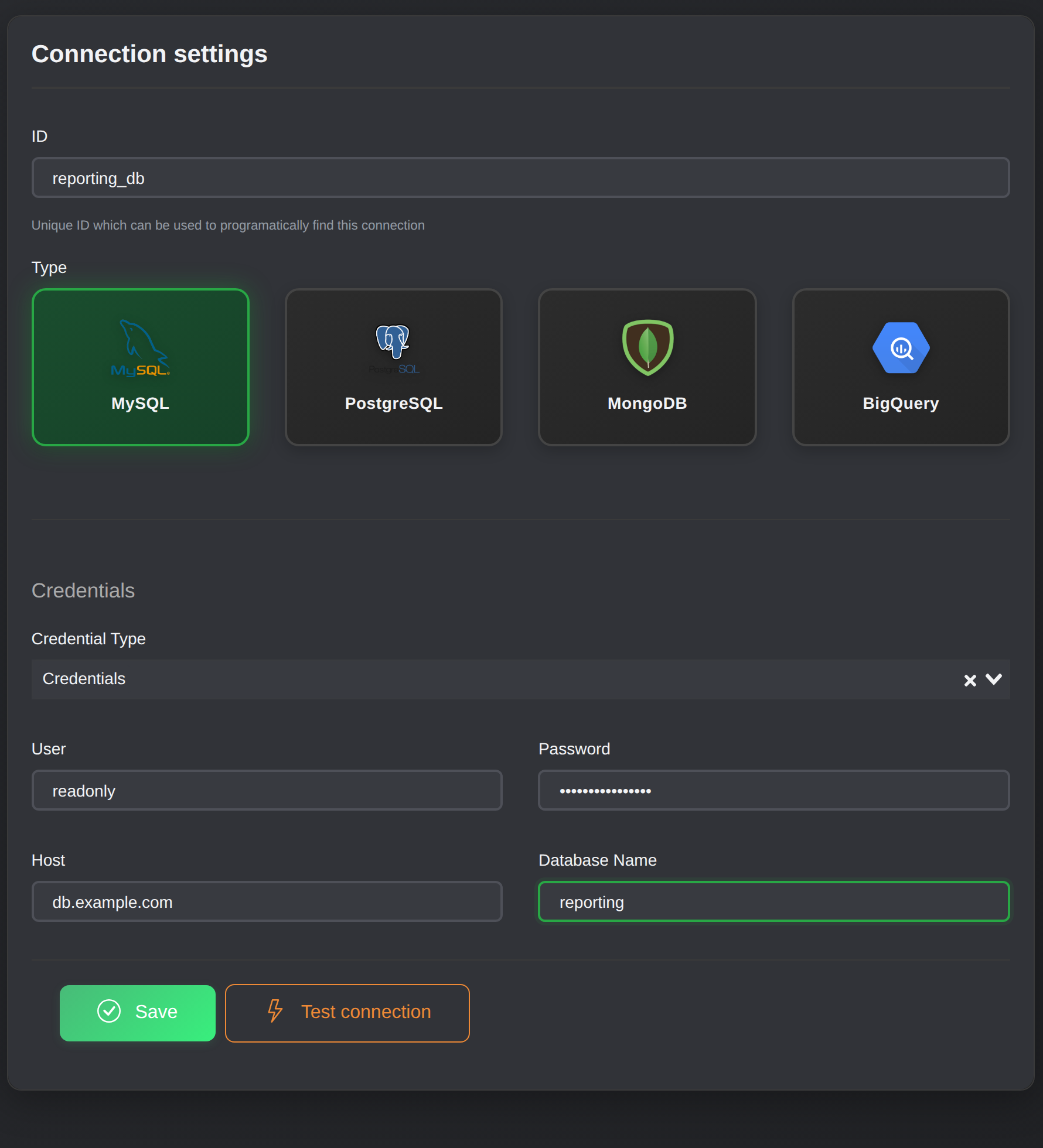
Creating a connection: pick the database type, then enter the credentials.
MongoDB takes a standard connection URI, for example mongodb://myuser:password@hostname:27017/mydb?authSource=admin. For BigQuery you create a service account with the BigQuery Data Viewer role, generate a JSON key, and paste it in with your GCP project ID.
If a MySQL connection fails, the Ratchet documentation has a troubleshooting table that maps the common errors to fixes. Access denied usually means wrong credentials or an address that isn't allowed. A certificate error means you can try tls=skip-verify.
Parameterized queries
Queries are stored on the connection and run by their qualified name: connectionID.queryID, for example conn-abc123.q-find-users. You pass parameters when you run the query. How parameters work depends on the database.
SQL
SQL expressions use ? as a positional placeholder. You pass the values as a flat array, in the same order:
SELECT * FROM users
WHERE name LIKE ?
ORDER BY created_at DESC
LIMIT ? OFFSET ?
// Executes: SELECT * FROM users WHERE name LIKE 'john%' LIMIT 20 OFFSET 0
ratchet.query('conn-id.query-id', ['john%', 20, 0]);
MongoDB
MongoDB expressions have no placeholders. The stored expression is a JSON-encoded command document, and each item in params is an object whose keys are appended to that command. Supported commands include find, aggregate, count and distinct.
Leave out of the stored expression anything you want to set at run time:
{ "expression": "{\"find\": \"orders\", \"projection\": {\"_id\": 1, \"total\": 1, \"status\": 1}}" }
ratchet.query('conn-id.q-orders', [
  { "filter": { "customerId": "abc123", "status": "pending" } },
  { "sort":   { "createdAt": -1 } },
  { "limit":  50 },
  { "skip":   0 }
]);
Two details matter here:
- Params append, they don't replace. If the stored expression already contains
filterand a param suppliesfiltertoo, the command contains the key twice and MongoDB uses the first one. Keep parameterized fields out of the expression. - Params must be objects. A scalar such as
["active"]is silently ignored, with no error.
For aggregate, always include "cursor": {} in the expression. You can fix the collection and options there and inject the pipeline as a param.
Running queries
From the SDK
import { Platform } from '@ptkl/sdk';

const ratchet = new Platform().ratchet();

const users = await ratchet.query('conn-id.q-by-email', ['user@example.com']);
console.log(users.data.data);
While you are developing a query, inspectQuery runs an expression inline without saving it:
const test = await ratchet.inspectQuery({
  name: 'conn-id.any',
  query: {
    id: 'test',
    expression: 'SELECT * FROM users WHERE email = ?'
  },
  params: ['user@example.com']
});
From workflows and functions
Saved queries can be executed from workflows, functions or the SDK. The SDK call shown above is the one to use in code.
From the command line
The ptkl ratchet commands cover the full lifecycle:
# 1. Validate credentials before saving
ptkl ratchet test --data '{"id":"my-postgres","type":"postgres","credentials":{...}}'

# 2. Create the connection
ptkl ratchet connection create --data '{"id":"my-postgres","type":"postgres","credentials":{...}}'

# 3. Develop a query ad hoc
ptkl ratchet inspect --data '{"name":"my-postgres","query":"SELECT 1","params":[]}'

# 4. Run a saved query
ptkl ratchet query --name my-postgres.ping
ptkl ratchet test checks a connection configuration without saving it, which is handy before connection create.
Safety notes
Ratchet's safety comes from a few documented choices:
- A fixed egress address. You allow one address in your firewall, not a range.
- A least-privilege database user. A read-only user can't change data, whatever query is saved.
- Pre-defined queries. Callers run a saved query by name and supply parameters. Ad-hoc
inspectcalls are the explicit exception, meant for development. - TLS. It is recommended for MySQL, PostgreSQL and MongoDB.
Where to use it
Use Ratchet when the data should stay where it is: reporting against a business-intelligence database, reading from a system you can't migrate yet, or looking up a value during a workflow run. If the data belongs to your product, a component is the better home.
A worked example
You want a workflow to list the twenty best-selling items from purchase events stored in MongoDB:
- Create a read-only MongoDB user and allow Protokol's address in the firewall.
- Add a connection and save a query
q-eventswith the expression{"aggregate": "events", "cursor": {}, "allowDiskUse": true}. - Test the pipeline with
inspectQuery. - Call the saved query with the pipeline as a param:
ratchet.query('conn-id.q-events', [
  {
    "pipeline": [
      { "$match":  { "type": "purchase" } },
      { "$unwind": "$items" },
      { "$group":  { "_id": "$items.sku", "sold": { "$sum": "$items.qty" } } },
      { "$sort":   { "sold": -1 } },
      { "$limit":  20 }
    ]
  }
]);
Learn more
The Ratchet documentation covers firewall setup per provider, every MongoDB command and the troubleshooting table. The ptkl ratchet reference covers the CLI. The TypeScript SDK page covers the client you call it from.