
Thunder: a fast key-value store for the data that isn't a component
Thunder is a key-value store for unstructured data like feature flags and settings, with fast reads and a cache option you control per call.
Not every piece of data deserves a typed schema. Feature flags, per-user preferences, small configuration blobs: you read them constantly and change them rarely, and a full component with fields and validation is more structure than they need. Thunder is the place for them. This post explains what Thunder is, how its reads and writes work, and how its cache option behaves, which is the part most worth understanding.
What Thunder is
Thunder is a key-value store for unstructured data. It is optimised for fast reads and infrequent writes, so it suits data that does not change often: configuration, feature flags, user preferences, or anything that does not belong in a typed component schema.
Records live in named collections. The collection name is the first argument to every method, and a collection is created implicitly the first time you write to it. There is nothing to define up front.
You use Thunder from the TypeScript SDK or from the ptkl command line.
Using it from the SDK
Thunder is exposed by the SDK's beta entry point:
import { Thunder } from '@ptkl/sdk/beta'

const thunder = new Thunder()
Reading
There are three read methods. Each takes a collection name, a filters object and an optional options object.
| Method | Returns |
|---|---|
find(name, filters, options?) |
all records matching the filters |
findOne(name, filters, options?) |
the first matching record, or null |
paginate(name, filters, options?) |
a paginated result set; pass page and perPage inside filters |
const flags = await thunder.find('feature_flags', { enabled: true })

const flag = await thunder.findOne('feature_flags', { key: 'dark_mode' })

const page = await thunder.paginate(
  'audit_log',
  { user_id: 42, page: 0, perPage: 20 },
  { cacheTTL: 30 }
)
The only option limits which fields come back:
const flags = await thunder.find(
  'feature_flags',
  { enabled: true },
  { cacheTTL: 60, only: ['key', 'enabled'] }
)
Writing
| Method | What it does |
|---|---|
insertOne(name, data) |
inserts a new record |
updateOne(name, filters, data) |
updates the first record matching the filters |
upsert(name, filters, data) |
updates a matching record, or creates one if none exists |
operation(name, filters, data) |
runs a custom server-side operation on matching records |
delete(name, filters) |
deletes all records matching the filters |
await thunder.insertOne('feature_flags', { key: 'dark_mode', enabled: false })
await thunder.updateOne('feature_flags', { key: 'dark_mode' }, { enabled: true })
await thunder.upsert('user_settings', { user_id: 42 }, { theme: 'dark', language: 'en' })
await thunder.operation('counters', { key: 'page_views' }, { $inc: { count: 1 } })
await thunder.delete('feature_flags', { key: 'old_flag' })
Note that delete removes every record that matches, so keep the filter specific.
The cache option: cacheTTL
Every read method accepts cacheTTL, the maximum age in seconds of a cached response you are willing to accept. It has three states, and leaving it out is not the same as passing 0:
cacheTTL |
Behaviour |
|---|---|
| omitted | Serve whatever is cached, regardless of age. The cheapest read. |
0 |
Skip the cache, read from the database, then repopulate the cache. |
> 0 |
Serve a cached response only if it is younger than cacheTTL seconds, otherwise refresh from the database. |
Values are not clamped: cacheTTL: 1 and cacheTTL: 86400 are both honoured exactly.
// Cheapest: any cached value will do.
const flags = await thunder.find('feature_flags', {})

// Tolerate up to 10s of staleness.
const recent = await thunder.find('feature_flags', {}, { cacheTTL: 10 })

// Must reflect the latest write, wherever it came from.
const live = await thunder.findOne('feature_flags', { key: 'dark_mode' }, { cacheTTL: 0 })
Omission is the default because Thunder is built for fast reads, and most callers read configuration where an answer that is a few seconds stale is fine.
When you actually need it
Writes made through Thunder already invalidate every cached read key for the collection. A read that follows an insertOne, updateOne, upsert, operation or delete sees current data without any option.
Reach for cacheTTL when data can change without a Thunder write: a direct database write, another service touching the same collection, or an invalidation that failed. The cache cannot see those changes.
The dashboard always reads live
Requests authenticated with a platform token, which means calls made from the Protokol Dashboard, read straight from the database whatever cacheTTL says. Operators looking at Thunder data in the dashboard always see the current values.
Components behave differently
Component reads have an option with the same name and unit, but the two stores differ in two ways:
| Components | Thunder | |
|---|---|---|
cacheTTL omitted |
same as 0, a fresh read |
serve any cached entry, regardless of age |
| Clamped | yes, 5 to 300 s | no, any positive value is honoured |
cacheTTL: 0 |
bypass the cache | bypass the cache |
If you move between the two, check what omitting the option means.
From the command line
ptkl thunder runs the same operations from a shell. Each command targets one entity type with -t, --type, the Thunder equivalent of a collection name.
| Subcommand | Description |
|---|---|
find, find-one, paginate |
read entities matching filters |
upsert, insert-one, update-one, delete |
change entities |
read, write |
low-level primitives that take a raw flag (Find, FindOne, Paginate / Upsert, InsertOne, UpdateOne, Delete, Operation) |
Filters and data are JSON strings. --data takes inline JSON, and --file takes a path to a JSON file and wins over --data if both are given.
ptkl thunder find --type invoice --filters '{"status":"paid"}' --only "id,total,customer"
ptkl thunder upsert --type invoice --filters '{"invoiceNumber":"INV-1002"}' --data '{"status":"paid"}'
ptkl thunder insert-one --type invoice --file ./invoice.json
The read commands also take --cache-ttl <seconds>. Use find, find-one and the other typed commands for everyday work. read and write exist for exercising a flag explicitly, for example when debugging.
When to use Thunder
Use it for data that is read often, changed rarely, and doesn't need a typed schema: feature flags, configuration, user preferences. Use a component when you want validated fields, relations, functions, workflows or access rules around the data.
A worked example: feature flags
Create a flag by writing to a collection that doesn't exist yet:
await thunder.insertOne('feature_flags', { key: 'dark_mode', enabled: false })
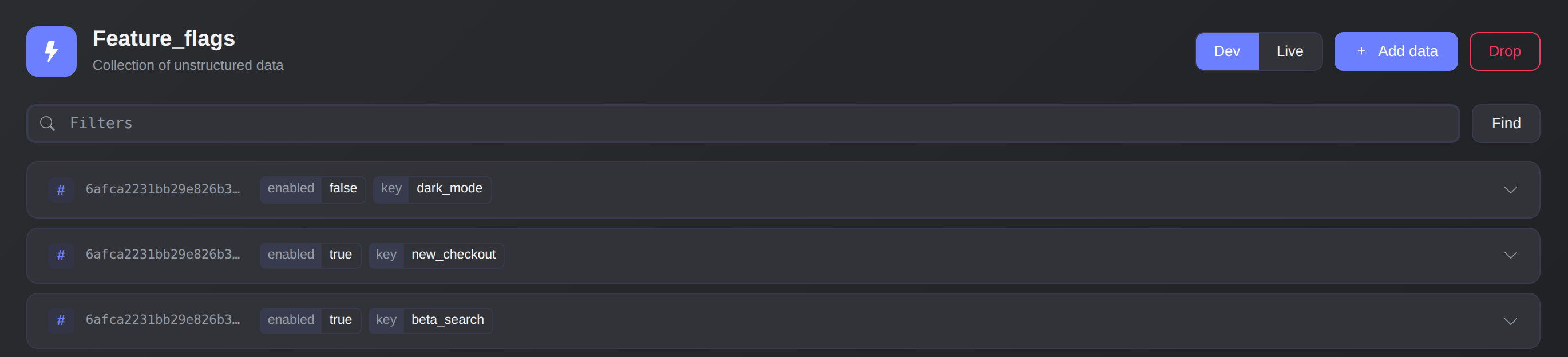
The feature_flags collection in the dashboard: one record per flag.
The collection feature_flags now exists. Your application reads the enabled flags on every request and tolerates a short delay:
const flags = await thunder.find(
  'feature_flags',
  { enabled: true },
  { cacheTTL: 60, only: ['key', 'enabled'] }
)
When you flip the flag, a normal Thunder write invalidates the collection's cached reads, so the next read sees it:
await thunder.updateOne('feature_flags', { key: 'dark_mode' }, { enabled: true })
Only if something outside Thunder edits the data would you pass cacheTTL: 0 on the reads that must be exact.
Learn more
- Thunder: SDK methods, read options and cache behaviour
- Components: Cache: how
cacheTTLworks for component reads