
Run identities: your code runs as someone you chose
Every function, component and workflow on Protokol runs as an explicit run identity. How identities are chosen, who may change code, and why.
Code on a platform like Protokol mostly runs without a person watching. A function runs when a request arrives. A component reacts to an event. A workflow fires on a schedule at three in the morning. Every one of those runs reads and writes your data, so every platform has to answer one question:
When code runs on its own, whose authority does it use?
The common answers all have problems:
- The author's. The code silently changes behaviour when its author changes role, and breaks when they leave. Worse, anyone who can edit the code borrows the author's access.
- The caller's. The same code does different things depending on who triggered it, and scheduled or event-driven runs have no caller.
On Protokol, every function, component and workflow runs as an explicit run identity. Here is how it works, and why we drew the lines where we did.
What a run identity is
Each piece of code has a run_as field. It names the identity the code runs as, written as a PRN:
run_as |
Runs as |
|---|---|
prn:role:<uuid> |
A project role |
prn:role:maintainer |
The project's Maintainer role. It resolves per project, so code copied between projects keeps working |
prn:api-user:<uuid> |
An API user |
prn:forge:<app-uuid> |
A Forge app, holding the permissions you approved for it |
The code gets that identity's permissions and role memberships. Nothing more, and nothing from whoever saved it or triggered it.
Some things are deliberately never identities:
- A user, or a user's OAuth token. People come and go; code shouldn't depend on one person's account.
- A role with admin rights, or an API user that holds one. Code never runs with the Owner's authority.
Each container has exactly one identity. A platform function has its own. A component's identity covers its functions, its event graph and its extension workflows. A workflow's identity covers its code and Kortex nodes. A component keeps its identity across versions, so publishing a new version or switching between dev and live never changes who the code runs as.
Code always runs with the identity's current permissions. Grant the role a new permission and the code has it on its next run. Take one away and it's gone on the next run too. There's no snapshot to forget about.
The rule underneath
One rule drives everything else:
Whoever can change a piece of code can act as its identity, and can read every secret that code receives.
That isn't a bug to be engineered away. If you can edit a function that runs as the Billing role, you can make it do anything the Billing role can do. Any platform that runs your code has this property. The honest thing is to say so, and to make the decision that matters a checked one.
So the platform checks the decision that matters: which identity a piece of code runs as, and who may change it.
You can only choose an identity you hold
When you create code or change its identity, you may pick only an identity you already hold:
- any role you are a member of;
- the Owner and Maintainers may also pick the Maintainer role, any non-admin role, and any API user;
- an API user may pick itself.
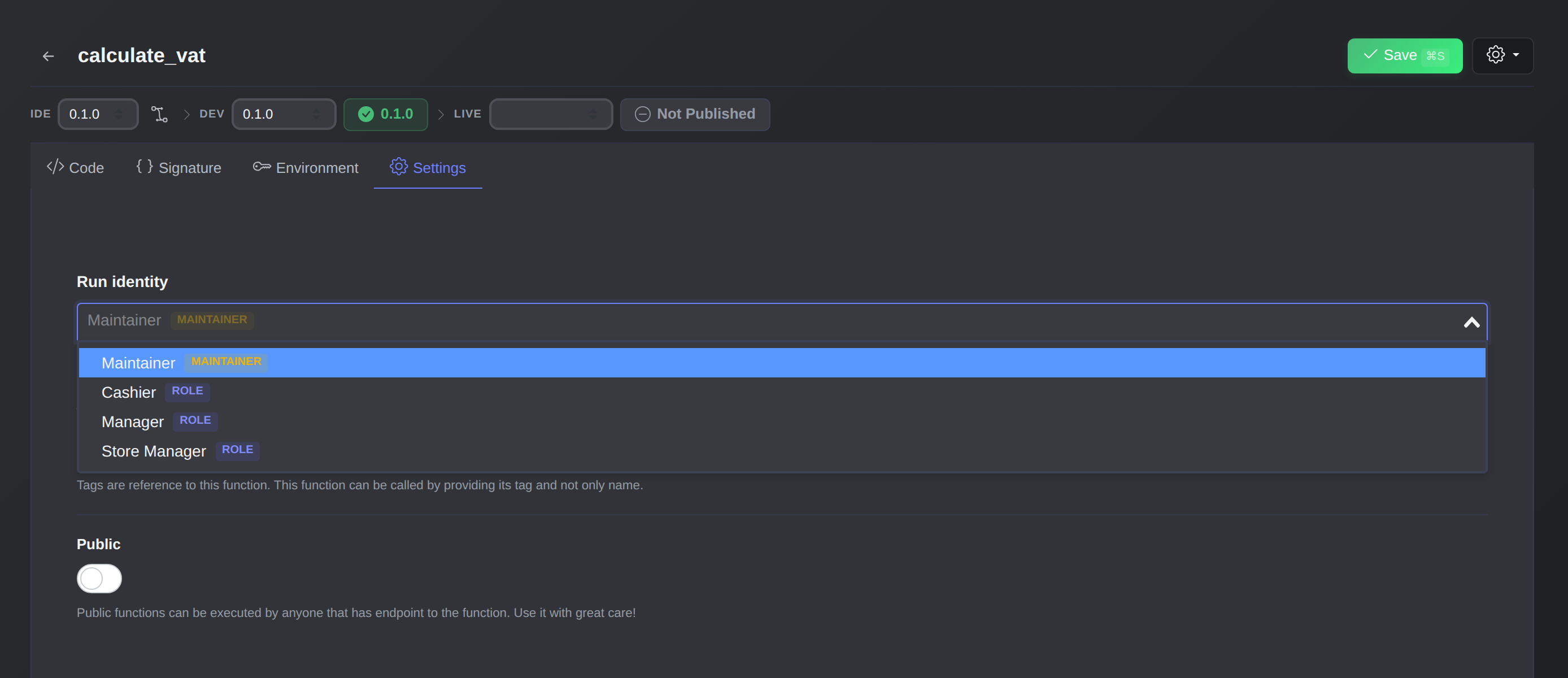
The identity picker lists only the identities you hold.
Membership counts, not matching permissions. Holding the same permission strings through another role isn't enough, because field policies match on roles.
This closes the escalation path. A developer who is a member of the Editors role can write code that runs as Editors, but can't write code that runs as Maintainer and borrow its access. The identity picker in the dashboard only lists what you may choose. The API, the toolkit and OAuth clients follow exactly the same rule.
From the toolkit it looks like this:
ptkl functions create -d '{"name":"send_welcome_email"}' \
  --run-as prn:role:5f0c1c1e-2a58-4a38-a7c1-7d2f3a1f8b11
If you name an identity you don't hold, the API tells you which one and why:
{
  "code": 403,
  "error": "identity_not_held",
  "message": "identity not held: prn:role:5f0c1c1e-2a58-4a38-a7c1-7d2f3a1f8b11"
}
Changing code needs everything the code receives
The same logic applies to editing existing code, not just creating it. To change code you need:
- Its run identity. You can't edit code that runs as a role you're not a member of, even if you leave
run_asalone. Otherwise editing would be a back door into that role. - Read access to its secrets, when it has any. A component that declares secrets needs
secrets::read <ref>on top of its settings permission. A function with encrypted environment values needssecrets::read base_functions.
When you open code you can't change, the editor is read-only and tells you exactly why, for example: "The code is read-only: it runs as Billing, which you do not hold." Settings that aren't code stay editable.
Changing an identity is a deliberate step. The new identity might lack something the code relies on, so before you save, the dashboard lists the permissions and role memberships the code would lose. You need to hold both the old and the new identity to make the switch.
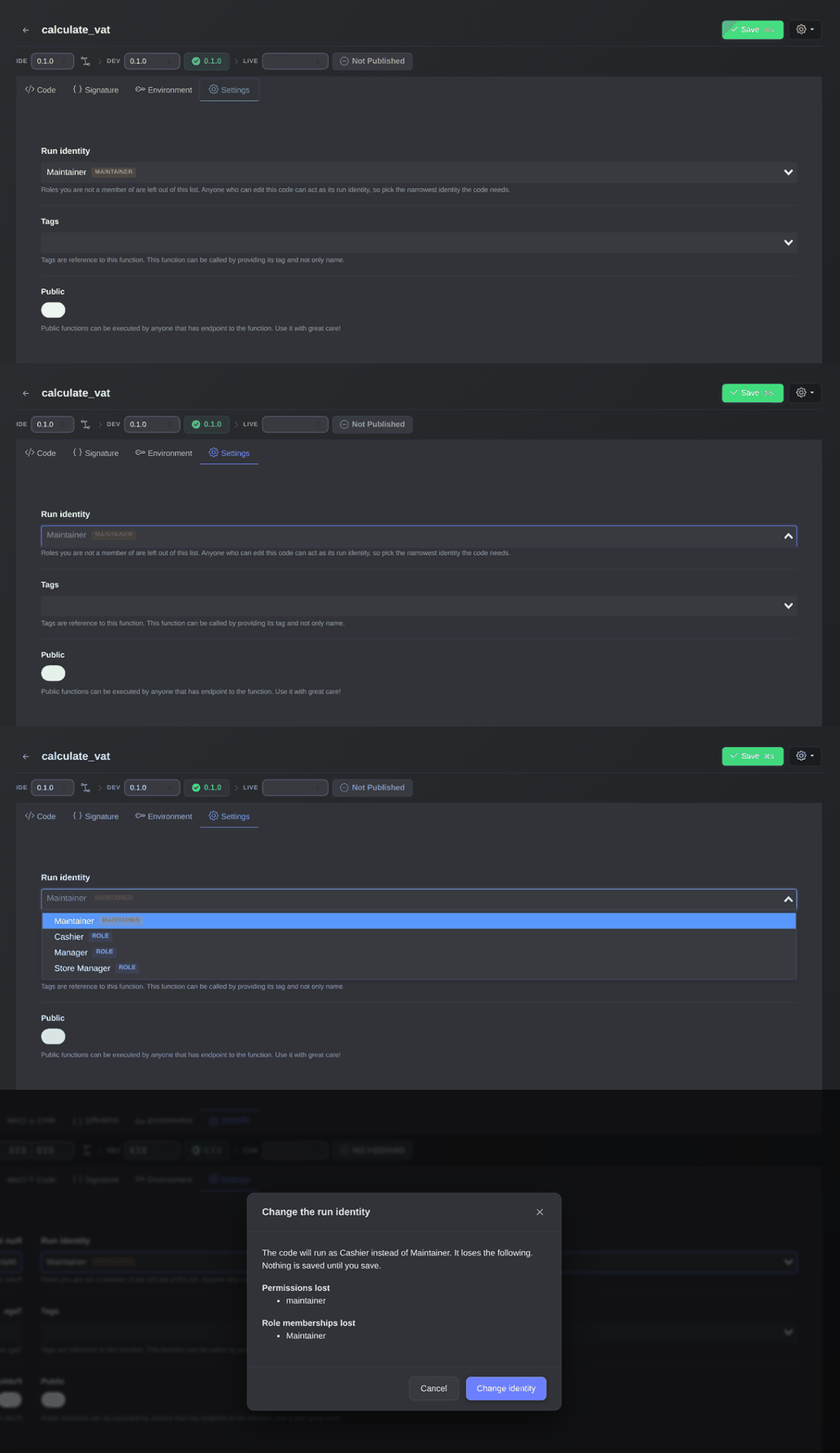
Pick a role and the dashboard shows what the code would lose before you save.
Narrower than the identity: per-unit capabilities
Sometimes a whole component is more than one developer should touch, but a single function inside it is fine. Component functions and workflow expression nodes can declare the capabilities they need. Such a unit runs with only those permissions, and only if its identity holds them, with no role memberships.
That lets a developer without secrets access change a unit that needs none: if you hold every permission the unit declares, you can edit it without holding the whole identity. Structural changes such as adding units, rewiring the graph or editing condition and switch nodes still need the identity, because they decide which code runs.
When an identity goes away
Roles and API users get deleted, and apps get uninstalled. A role or API user that some code still runs as can't be deleted. The delete is refused with a list of where it's in use, so you can move that code first.
If an identity does disappear, for example because an app was uninstalled, the code stops running and can't be changed until someone who holds another identity reassigns it. It never quietly falls back to something more powerful. Owners and Maintainers can list all such code in one place.
Forge apps run as themselves
Code that a Forge app creates runs as the app's own identity, holding exactly the permission set you approved when you installed or updated that revision. No person holds that identity, so nobody edits that code by hand. Only the app's install and update flows change it, along with the app's own pages when the Owner or a Maintainer uses them.
What a run identity doesn't do
A run identity limits what code can reach. It doesn't make the code itself correct. Inputs are still untrusted: request bodies, query strings, event payloads, configuration. Code that lets an input pick a collection name, a URL or whether a check runs is a bug in that code, whatever identity it runs as.
And because whoever can change code can act as its identity, edit rights are access rights. Who gets Owner, Maintainer or deploy rights in your project, and which apps you approve, stays your team's decision.
Getting started
- Create narrow roles for what your code actually does, such as "Order sync" or "Notifications", instead of reusing broad ones.
- Assign identities through the dashboard's picker, or with
--run-asin the toolkit. Pick the narrowest identity that still lets the code do its job. The dashboard shows what the code would lose before you save. - Use capabilities on component functions and workflow nodes so that more of your team can safely change small units.
The full reference, including every error code and API endpoint, is in the documentation: Run identity and the Security model.