
Forge: ship your own apps, services and UI on Protokol
Forge packages views, services, install scripts and permissions into one versioned app, built from a single ptkl.config.js manifest and developed locally with the ptkl toolkit.
Components hold your data and logic. Sometimes you need a screen for operators, an HTTP endpoint for a partner, or a setup step for a project. Forge is the app framework for Protokol that packages all of this into one versioned app. You find it in the dashboard under Developer › Forge.
What a Forge app is
A Forge app is a versioned bundle, described by a single ptkl.config.js manifest, that you build with the ptkl toolkit and run on the platform. It can ship UI, server-side code, or both. You develop against a dev environment and deploy versions, so you can test changes before they reach live.
The manifest's type decides what the app can be:
| Type | What it is |
|---|---|
platform |
Runs inside the Protokol dashboard. Views stay platform-only or can be made public. It can declare services. |
public |
A public-facing app served on its own *.ptkl.app subdomain, with optional server-side rendering and custom domains. All its views and services must be access: "public". |
service |
Headless and API-only. No views, reached through service domains. |
Platform is the default. Only platform apps run inside the dashboard shell and can mix platform and public views and services.
The manifest
ptkl.config.js is a default export. It declares the app's identity, entry points, services, lifecycle scripts and permissions:
export default {
    name: 'invoice-app',
    version: '1.0.0',
    type: 'platform',
    label: { locales: { en_US: 'Invoice App' } },
    views: {
        main: path.resolve(__dirname, 'src/main.tsx'),
    },
    services: [
        {
            name: 'create-invoice',
            script: path.resolve(__dirname, 'src/services/createInvoice.ts'),
            access: 'platform',
            permissions: ['invoices:read', 'invoices:write'],
        },
    ],
    scripts: {
        install: path.resolve(__dirname, 'src/scripts/install.ts'),
    },
    install_permissions: ['manage base_components'],
    runtime_permissions: ['invoices:read', 'invoices:write'],
}
A few fields to know:
nameandversionare required. Each uploaded version is stored separately, and an app can have up to 5 versions.viewsmaps view names to entry files, up to 10 per app. Themainview is the one the dashboard loads.serviceslists server-side scripts, up to 20 per app.permissionslists permissions the app exposes. Once deployed, you can assign them to any role.
When you run ptkl forge bundle, the toolkit produces a .tar.gz with a generated manifest.json, a browser/ folder for what a browser is served, and a server/ folder for services and lifecycle scripts.
Views and AppView
Each key in views becomes its own bundle. A view can also be embedded in another app. The owning app registers the view once, at the top level of its entry file:
import { registerAppView } from '@ptkl/components';

registerAppView('onboarding', () => (
  <BrowserRouter>
    <App />
  </BrowserRouter>
));
Another app renders it with <AppView scope="crm" view="onboarding" fallback={<p>Loading…</p>} />, imported from @ptkl/components.
scope is the Forge app name and view is the name declared in the manifest. The view mounts inside a Shadow DOM, so styles don't leak in either direction. If the bundle fails to load, AppView shows an error state, or your errorFallback if you pass one.
A host and its embedded views are separate bundles with separate React trees. The pub/sub helpers in @ptkl/components let them talk without sharing state:
import { publish, useSubscribe } from '@ptkl/components/event';

publish('cart:updated', { itemCount: 3 });
const msg = useSubscribe<{ itemCount: number }>('cart:updated');
Messages travel as window events, so they cross bundle and Shadow DOM boundaries. There is no replay: useSubscribe returns undefined until the first message after mount. Use noun:verb topic names; locale is reserved for the platform.
Install and uninstall scripts
Scripts prepare the project for your app and clean up afterwards. Declare them under scripts in the manifest. Both are optional.
- Install runs every time a version is deployed to dev or live, including updates and explicit reinstalls. It must be idempotent, so look a resource up before you create it.
- Uninstall runs when the app is deleted. If it fails, the app is still removed.
If an install script throws, the deployment is blocked and the error appears as the app's status_message. Scripts have no logging, so a descriptive error is your only diagnostic. They run in a sandbox with a 60-second timeout and 64MB memory limit.
A script gets a token limited to the manifest's install_permissions, and it uses the SDK like any other code. Check whether a resource exists before you create it.
Services
A service is a server-side script that runs in an isolated sandbox and answers HTTP requests. Each has an access scope:
| Scope | Caller | Token the script gets |
|---|---|---|
public |
Anyone, no authentication | A token minted server-side with the service's declared permissions |
platform |
A user session or actor token | The intersection of the caller's permissions and the service's |
The caller of a public service never sees the token. A service's permissions must be a subset of the app's runtime_permissions.
Inside a service you get input, query, headers, context, $variables and a response builder, for example response.json(result.data?.items?.[0]).
Services are reached at {uuid}.public.service.ptkl.app/{service} for public and {uuid}.service.ptkl.app/{service} for platform services. Execution is limited to 5 minutes and 128 MB. Your own views call services through Forge.runService() from @ptkl/sdk/beta, which resolves the app and authentication for you.
Variables
Variables are per-environment configuration: dev and live each have their own set. They sit outside the manifest, so you can change them without redeploying, and services and install scripts read them as $variables.
An app reads its own variables with no permission. Writing them needs manage_variables forge, which only reaches the app's own variables.
From @ptkl/sdk/beta, platform.forge().getVariables() reads them and platform.forge().addVariable('WEBHOOK_URL', 'https://example.com/hook') sets one.
A value can be plain, or stored as a secret with a prefix. secret::<value> stores an encrypted value (see Secrets), and secretgen::random(32) has the platform generate one. Secrets are write-only: every read shows secretref::, and only your services and scripts receive the real value. Plain values are stored as readable text, so never put a secret in one. Writes replace the whole environment, so send secretref:: back for any secret you want to keep. A manifest can set defaults under variables, but it refuses secret:: values, because the manifest is readable.
Public apps
A public app is a public-facing app that anyone can reach, with no dashboard shell (no sidebar or header). It automatically receives an API role, an API user, an API token and a generated subdomain such as happy-cat.ptkl.app. The subdomain is active immediately, with no DNS setup.
Set ssrRenderer in the manifest to a server-side rendering entry point (for example path.resolve(__dirname, 'src/ssr/renderer.tsx')) and the platform pre-renders the app on the server before sending it to the client. That option is only available for public apps.
Public views and public services also exist inside platform apps. There, a public view is a standalone single-page app without the shell and without the $forge global, served at {uuid}.public.ptkl.app/{view-name}. A public app is the whole app made public instead of one view.
Custom domains
A public app can also be served from your own domain, such as app.example.com:
- Register the domain. You get a validation key, and the domain is stored as unvalidated and doesn't serve traffic.
- Create a TXT record on the domain whose value is that key.
- Verify. The platform looks up the TXT record and checks for an exact match, and on success the domain becomes active. If the key has expired, refresh it first.
- Point a CNAME record at
ptkl.app. Use a subdomain: apex domains are not supported.
The toolkit wraps these steps as ptkl forge domains add|verify|refresh|remove. Removing a domain leaves its DNS records for you to clean up.
The local development loop
Set up a profile, then run the dev server from your app:
ptkl forge dev -p ./my-app
It starts up to three things:
| Component | Port | Purpose |
|---|---|---|
| Vite dev server | 5173 | Serves your view with hot module replacement |
| Service dev server | 4113 | Runs your services locally, rebuilding on change |
| Dev hub | 4111 | Relays embeddable view bundles between apps |
Call a service locally at http://localhost:4113/{service-name}; the response wraps the output with execution logs. Use --view <name> to serve a different view and --env dev|live to pick the environment.
Then ptkl forge bundle -p . --upload builds and uploads, and ptkl forge install -p . --env dev runs the install script. Locally there is no stored app record, so pass variables with --var KEY=value.
Tools for AI agents
A tool is a server-side script your app declares for AI agents. The agent calls it to read or change data in your app's backend, and the platform checks the input against a JSON Schema you provide before your script runs. Tools run in the same sandbox as services, with only the permissions you list for the tool.
| Tool | Service | Page tool | |
|---|---|---|---|
| Declared in | tools in the manifest |
services in the manifest |
App code, at runtime |
| Runs | On the server | On the server | In the user's browser |
| Called by | Agents | HTTP clients and your views | The Kortex assistant, while the app is open |
| Caller needs | tool::<name> forge::<app-uuid> |
service::<name> forge::<app-uuid> |
Nothing extra |
tools: [
    {
        name: 'cancel_order',
        description: 'Cancel an order that has not shipped yet.',
        input_schema: {
            type: 'object',
            properties: { order_id: { type: 'string' }, reason: { type: 'string' } },
            required: ['order_id'],
        },
        destructive: true,
        permissions: ['orders:read', 'orders:write'],
        script: path.resolve(__dirname, 'src/tools/cancelOrder.ts'),
    },
],
Mark tools honestly. A read_only tool runs without asking, a tool with neither mark asks for approval first, and a destructive tool always asks, which an admin can't relax. An app can declare up to 50 tools, and a tool can't be both marked. Each approved tool adds a permission you add to a role, so an agent can call a tool only if the identity it runs as holds that permission. An admin grants agents their tools under Workforce settings, in Forge app tools. The tools also appear on the install and update screen, so they are part of what you approve.
The same tools are reachable over MCP, so AI agents outside Protokol can call them, with the same permissions and approval. To see how the assistant and agents use them, read the Kortex and Workforce posts.
How approval works
Installing or updating a marketplace app is the approval. The screen lists everything the revision declares: install permissions, runtime permissions, the app's own permissions and entitlements, plus any per-service and per-view permissions. You approve exactly the revision you reviewed. If the app changes while you review, the install is refused and you review again. You must hold every permission in the set to approve it.
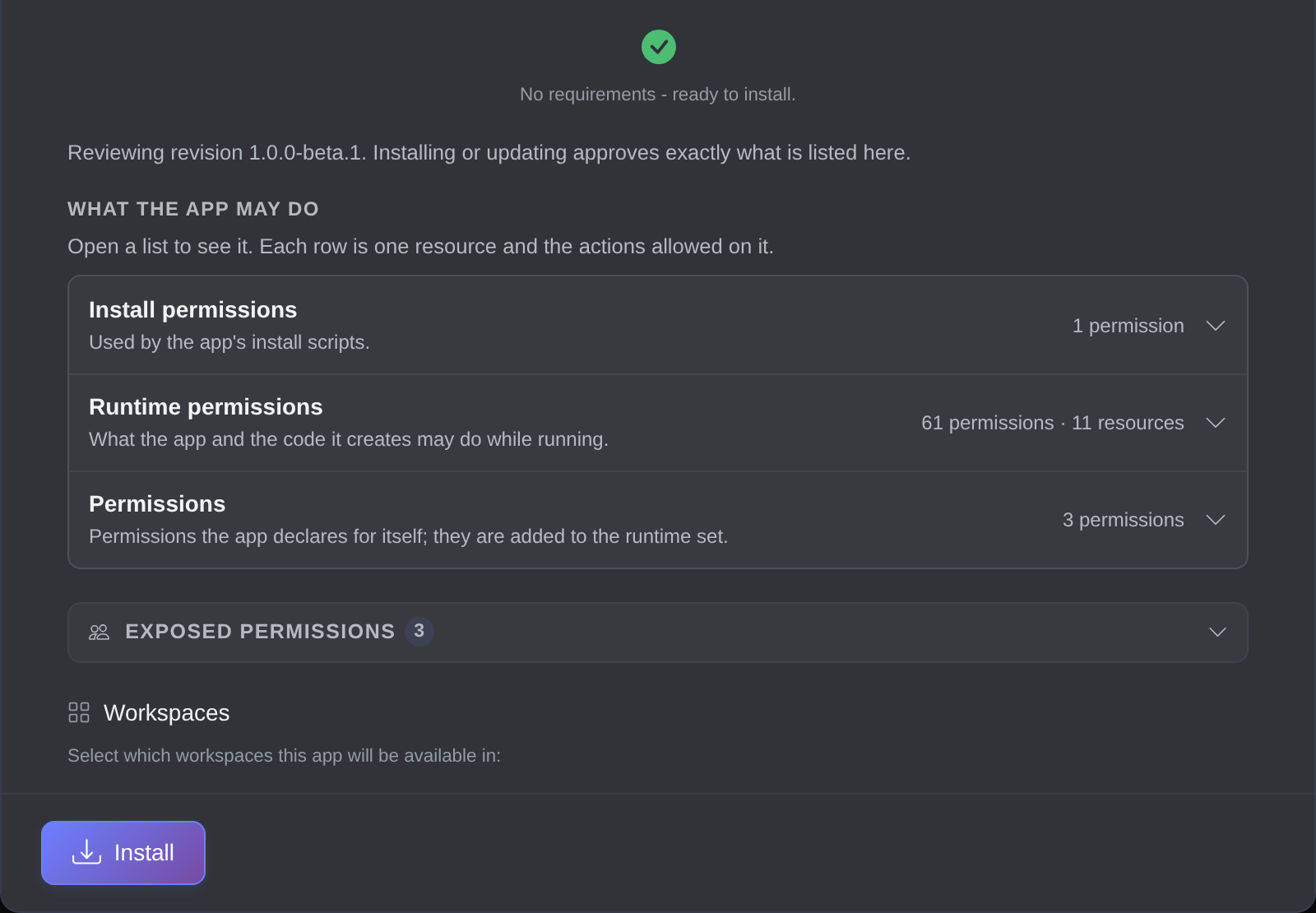
The approval screen lists everything the revision declares before you install.
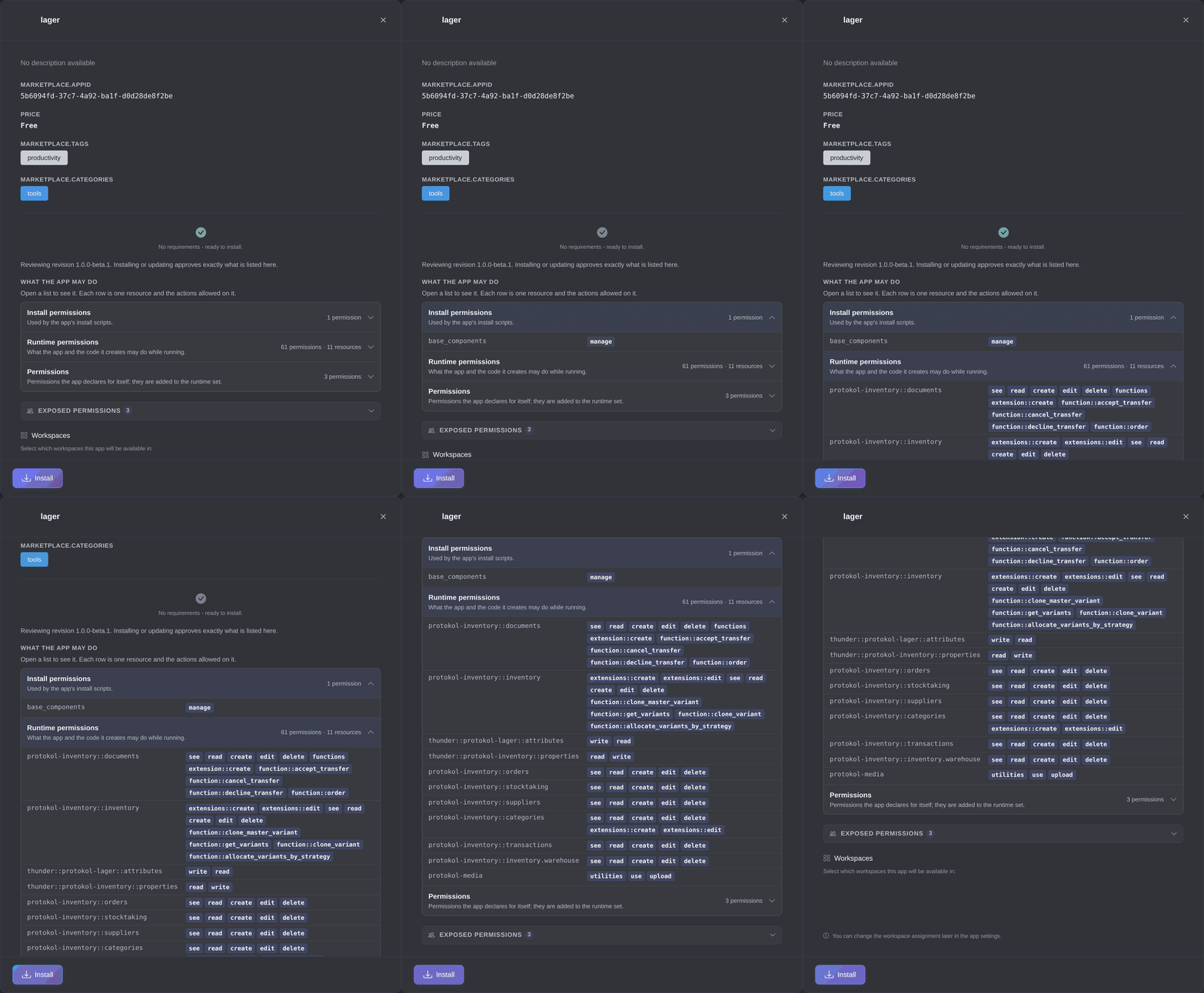
Open a list to see each resource and the actions the app is allowed on it.
Code the app creates runs as the app's own identity (see Run identities), which holds the approved permissions and nothing else. Only a person approves; the app, its views and its scripts never can. Who can approve what depends on the permissions they hold: the Owner covers everything, and a Maintainer covers everything except admin, maintainer and Kortex permissions it doesn't hold. Read the security page before you install apps from sources you don't know.
Worked example: invoice tracking
If the tracking page should be a whole public site, make it a public app. Here, declare a track-invoice service with access: 'public' and permissions: ['invoices:read'], return only the invoice status, test it on port 4113 with ptkl forge dev, then bundle and upload. Whoever installs it reviews the permissions first.