
Satellites: connect your own JSON-RPC service to a project
Satellites connect a custom JSON-RPC service to your project without publishing to the marketplace, with versioned schemas, Dev/Live rollout, RBAC checks, health and logs.
Sometimes a workflow needs to call a service that only your team uses: a CRM, a pricing engine, an internal tool. Publishing it as a marketplace integration is more than you need.
A satellite is a project-level JSON-RPC integration that your team owns and configures. It is not a marketplace integration. It is visible only in the Developer section of the project where you created it (in the dashboard, Developer › Satellites), and only to users in that project.
How a satellite is built
A satellite has two parts:
| Part | Purpose |
|---|---|
| Template | Operational metadata: ID, label, JSON-RPC endpoint URL, optional health check URL, optional logs URL, auth type and timeout. |
| Schema version | Versioned capabilities: permissions, JSON-RPC commands and workflow nodes. |
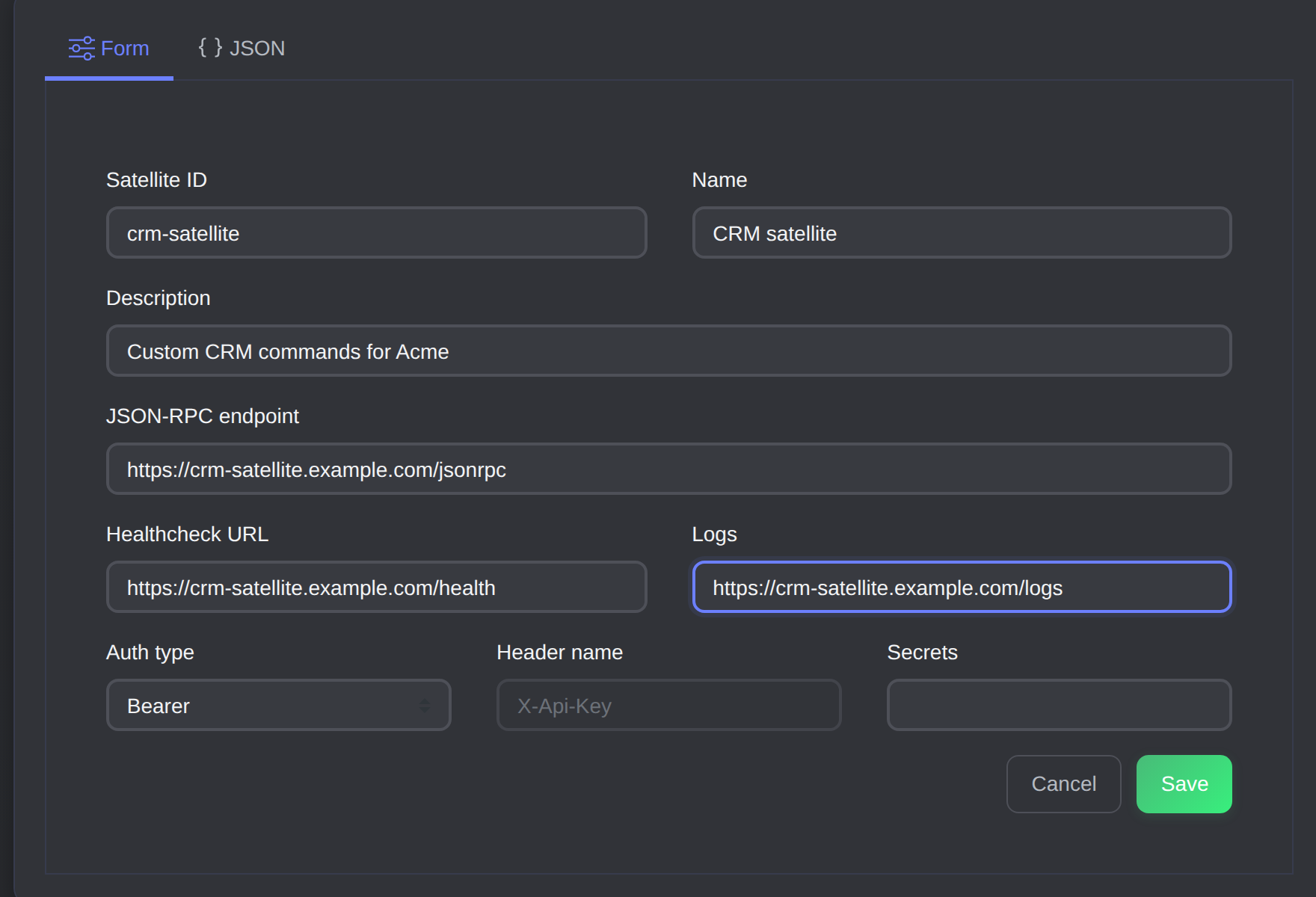
The Create satellite form: ID, endpoint, health check URL and auth type.
The template records which schema version is active in each environment, in dev_version and live_version. Your service exposes one JSON-RPC endpoint over HTTP. You don't create a route per command: the schema maps each platform command name to a JSON-RPC method.
A template
{
  "id": "crm-satellite",
  "label": { "en_US": "CRM Satellite" },
  "jsonrpc_endpoint_url": "https://crm-satellite.example.com/jsonrpc",
  "health_check_url": "https://crm-satellite.example.com/health",
  "logs_url": "https://crm-satellite.example.com/logs",
  "auth_type": "bearer",
  "auth_config": { "secret": "dev-secret" },
  "timeout_ms": 30000
}
Two auth types are supported. With bearer, Protokol sends Authorization: Bearer <secret>. With api_key, it sends your chosen header (auth_config.header_name, required) with the secret as its value. Secrets are encrypted at rest, decrypted at runtime, and injected only when requests go to your service.
A versioned schema
{
  "schema_version": "2026-06-22.crm.v1",
  "permissions": [
    { "action": "execute", "label": { "en_US": "Execute CRM satellite commands" } }
  ],
  "jsonrpc_commands": [
    { "name": "echo", "method": "echo", "permission_action": "execute" },
    { "name": "uppercase", "method": "workflow.uppercase", "permission_action": "execute" }
  ],
  "workflownodes": [
    {
      "name": "satellite.crm.uppercase",
      "label": { "en_US": "Uppercase Text" },
      "command": "uppercase",
      "inputs": [{ "name": "text", "type": "string", "required": true }],
      "outputs": [{ "name": "uppercase", "type": "string" }]
    }
  ]
}
Only schema_version and jsonrpc_commands are required. Each command has a stable name, a JSON-RPC method, and an optional permission_action that defaults to the command name.
Dev and Live rollout, and rollback
Deploying a schema version stores its schema_version string in dev_version or live_version. Rolling back is the same operation: deploy an older version to that environment. Protokol sends the active environment to your service in the X-Env header, so you can route to development or live behaviour on your side.
ptkl satellite deploy crm-satellite --schema-version 1.1.0 --target-env dev
ptkl satellite rollback crm-satellite --schema-version 1.0.0 --target-env live
Every request also carries the deployed schema_version in params.satellite. That lets one deployment of your service handle an old and a new schema during a rollout.
Calling commands
From the SDK:
import { Satellites } from '@ptkl/sdk/beta';

const satellites = new Satellites({
  token: process.env.PROJECT_API_TOKEN,
  env: 'dev',
});

const response = await satellites.execute('crm-satellite', 'echo', {
  inputs: { message: 'hello' },
});
From a workflow, add the satellite's workflow node to the canvas. Each node maps to one command, and running it calls Satellites.execute() for that command. Satellites provide workflow nodes, not workflow events or render events. From the command line, ptkl satellite execute <id> <command> does the same.
Satellites can also back the Resource Resolver. A PRN of the form prn:satellite:<satellite_id>:<path> is proxied to your command named resolve_resource.
Permissions
The schema's permissions are exported into the platform's role system, where you assign them to roles. Protokol generates the key as {action} satellite::{satellite_id}, such as execute satellite::crm-satellite.
Protokol resolves authentication and authorization before it calls your service, and a command only runs if the permission it requires exists and is assigned. If you remove a permission in a later schema version, stale role assignments can be cleaned up later in the background, but runtime checks only allow commands whose permission currently exists and is assigned. Your service also receives the caller's identity in X-Claims-Entity-* headers and in params.context.
Health and logs
If you set health_check_url, Protokol checks it every 60 seconds and shows the result in the Developer UI. If you set logs_url, the Developer UI loads logs from your service through Protokol, passing a since timestamp. ptkl satellite logs <id> fetches them from the CLI.
The contract your service implements
The JSON-RPC contract is the reference for implementors. The essentials:
- Request.
POSTto yourjsonrpc_endpoint_urlwith a JSON-RPC 2.0 body. Protokol never sends batches or notifications. Theidis always a string. - Dispatch on
method.paramshas four keys:inputs(forwarded as the caller sent it, with no validation),context,satelliteandtenant. Validateinputsyourself. - Scope by tenant.
params.tenant.project_uuidis your tenant boundary if one service backs several projects. - Respond with HTTP 200. Put failures in the JSON-RPC
errorobject. A non-2xx status is turned into an opaque failure and yourerroris never read. Protokol doesn't branch on error codes, so writemessagefor a human. - No retries. Each execution makes exactly one HTTP attempt, within
timeout_ms(30 seconds if unset). The platform provides no idempotency, so dedupe on a key frominputsif a command isn't naturally idempotent. - Size. Responses are read up to 10 MB. Return references rather than large payloads.
- Authenticate requests. Verification is a constant-time comparison of the shared secret. If no secret is configured, requests arrive unauthenticated, so reject those.
The health check is different: it is a GET with a 5-second timeout, sent without your secret, so keep that route outside your auth middleware and return nothing sensitive from it. Any 2xx is healthy, and an unhealthy satellite is still called.
A minimal handler looks like this:
app.post('/jsonrpc', async (req, res) => {
  if (!authorized(req)) {
    return res.status(401).json(rpcError(req.body?.id ?? null, -32600, 'unauthorized'));
  }
  const { id = null, method, params } = req.body ?? {};
  const handler = handlers[method];
  if (!handler) return res.json(rpcError(id, -32601, `unknown method: ${method}`));
  // run the handler, then return { jsonrpc: '2.0', id, result }
});
A worked example
You want a workflow step that normalizes a contact name using your own service.
- Register a template
crm-satellitewith your endpoint and a bearer secret. - Create schema version
2026-06-22.crm.v1with theuppercasecommand and a workflow node for it. - Deploy it to
devand assignexecute satellite::crm-satelliteto the roles that should run it. - Add the node to a workflow and test it against Dev.
- When it behaves, deploy the same version to
live. If a later version misbehaves, rollliveback to the earlier one.
Learn more
The Satellites guide, the JSON-RPC contract (with a full reference server) and the ptkl satellite reference cover the details. The TypeScript SDK page documents the client used to call them.