
OAuth 2.0: let apps act on a user's behalf, with consent
Register an OAuth client, run the authorization code flow with PKCE, and let users approve exactly what your app may do in their project, with Sign in with Protokol (OpenID Connect) on top.
Sometimes an app that is not part of your project needs to call the Protokol API as a user: a script, a CLI, a server-side integration, a mobile app. Protokol uses the standard OAuth 2.0 authorization code flow with PKCE instead. The user signs in, sees exactly what the app can do, and approves or denies it.
If you are building a site that people open from Protokol with a Launch URL, create a web app instead: see Web apps: sites people open from Protokol and sign in to. This post covers registering an OAuth client, the flow and tokens, scopes and consent, what users and project admins can control, Sign in with Protokol (OpenID Connect), and the security notes you should know before you ship.
Register a client
A project admin creates the client in the dashboard: open OAuth in the sidebar, choose Clients, then Create client. The main fields:
| Field | What it does |
|---|---|
| Name | Shown to users on the consent screen |
| Client type | Public for code that cannot keep a secret (single-page apps, mobile apps, CLIs). Confidential for server-side code |
| Access type | User connection acts as the signed-in person. Project installation acts for the project and requires a confidential client |
| Application type | Web or Native, which decides which redirect URIs are accepted |
| Redirect URIs | Exact callback URIs your app uses |
| Allowed permissions | The most your app may ever request |
| Allow refresh tokens | Required if the app will request offline_access |
| Token policy | Optional access token lifetime (60 to 900 seconds) and, for public clients, refresh token lifetime (1 hour to 30 days) |
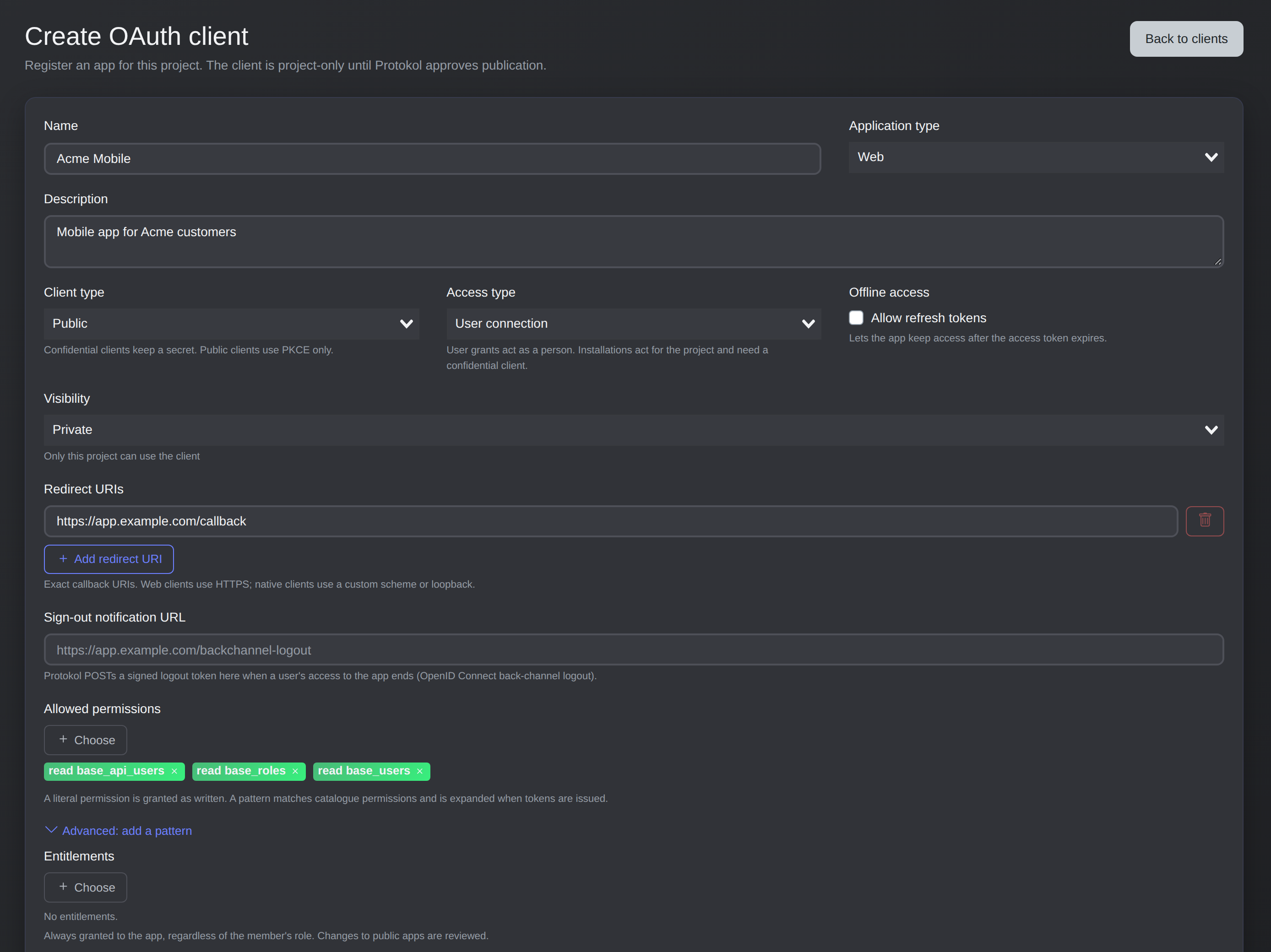
Creating a public client: name, redirect URI and the permissions it may request.
For a confidential client the client secret is shown once, so copy it into your secret store. You can rotate it later, and the previous secret keeps working for the grace period you configured. The client id looks like pk_cli_….
Redirect URIs are matched exactly. Web apps use an https:// URI with no wildcards and no fragments. Native apps can also use a reverse-domain scheme such as com.example.app:/callback or a loopback URI like http://127.0.0.1:PORT/path.
A new client works only in the project that owns it. To let users connect it in other projects, choose Request publication. Protokol reviews it, and once approved, any project can authorize it, subject to that project's own app policy.
The flow
Only the code response type and the S256 PKCE method are supported. The supported grant types are authorization_code and refresh_token.
- Your app creates a
code_verifierand sends its SHA-256 hash as thecode_challenge, plus astate. - It sends the user to
/v1/oauth/authorize. - The user signs in, reviews the consent screen and approves.
- Protokol redirects to your
redirect_uriwithcode,stateandiss. - Your app exchanges the code for tokens at
/v1/oauth/token.
The authorize request looks like this:
GET https://lemon.protokol.io/v1/oauth/authorize
  ?response_type=code
  &client_id=pk_cli_0123456789abcdef0123456789abcdef
  &redirect_uri=https%3A%2F%2Fapp.example.com%2Fcallback
  &project_id=YOUR_PROJECT_ID
  &state=STATE_FROM_STEP_1
  &code_challenge=CHALLENGE_FROM_STEP_1
  &code_challenge_method=S256
  &scope=perm64%3AcmVhZCBwcm9kdWN0cw%20offline_access
On the callback, check that state matches what you stored and that iss equals the issuer from the discovery document. The code is single-use and expires after 10 minutes. Then exchange it (the body is form-encoded, not JSON):
curl -X POST https://lemon.protokol.io/v1/oauth/token \
  -d grant_type=authorization_code \
  -d client_id=pk_cli_0123456789abcdef0123456789abcdef \
  -d code=pk_ac_CODE_FROM_REDIRECT \
  -d redirect_uri=https://app.example.com/callback \
  -d code_verifier=VERIFIER_FROM_STEP_1
A confidential client authenticates with its secret instead (-u 'CLIENT_ID:YOUR_CLIENT_SECRET'). The response holds the access_token, its expires_in, the granted scope, and the project_id the token is bound to. Send the token as Authorization: Bearer <access_token>.
A token is issued for one user in one project, so you send no project header, and calls always act in that project. Access tokens last 15 minutes by default.
Refresh tokens
Request offline_access to get a refresh token and renew access without asking the user again. Public clients rotate the refresh token on every use: store the new one before you use it, and never refresh concurrently, because reusing an old token ends the session. Confidential clients keep the same refresh token. Treat invalid_grant as "sign the user in again".
Call /v1/oauth/revoke when the user signs out; confidential clients can use /v1/oauth/introspect. Discovery is public at /.well-known/oauth-authorization-server, so read endpoints and issuer from there.
Scopes and consent
Each scope token is a Protokol permission name, encoded as perm64:<base64url of the name>. For example, read products becomes perm64:cmVhZCBwcm9kdWN0cw:
printf '%s' 'read products' | basenc --base64url | tr -d '='
You can also request a pattern with pattern64:, which is expanded at authorization time to the exact permissions that exist. offline_access is a plain token, not a permission.
What the app actually gets is the intersection of three things, minus anything the user unticks on the consent screen:
- what the app requests;
- what the client is allowed to request;
- what the signed-in user can do in that project.
A user cannot hand an app more than they hold themselves. The token response scope lists the final permissions, so read it instead of assuming you got everything. Adding permissions later always needs the user's consent: run the flow again with a larger scope.
Requests that send X-Project-Env: dev are rejected unless the token includes dev env_access, and the user must hold it too.
What users and admins control
Users and project admins can disconnect apps from the dashboard (OAuth → Connected apps, and Authorized apps in the account menu). Project admins can also restrict which apps their members may connect under OAuth → App policy. A client blocked by the policy gets unauthorized_client at authorization, so if you publish an app, ask admins to add it to their allow-list when a project uses that policy.
Public clients that users of other projects sign in to (a CLI, a mobile app) need an install by a project admin, who can optionally limit it to some workspaces. Uninstalling revokes the access of the project's members.
Sign in with Protokol (OpenID Connect)
If you only need to know who the user is, add openid to the scope. Protokol implements OpenID Connect Core 1.0 on the same flow, with response_type=code and PKCE only (no implicit or hybrid flow).
- Discovery:
/.well-known/openid-configuration, with signing keys at/.well-known/jwks.json. - Scopes:
openidreturns anid_token;profileaddsnameandemailaddsemailandemail_verified, both read from the userinfo endpoint. The user can untick the last two. - ID token: a JWT signed with RS256, valid for 5 minutes. Claims include
iss,sub,aud,azp,iat,exp,auth_time,nonceandat_hash. It carries no name or email. - Parameters:
nonce,prompt(none,login,consent,select_account) andmax_age.
Identify users by sub together with the issuer, never by email. sub is stable and is the same for a user across all apps. An app that requests only openid profile email needs no API permission at all. A client with the Project installation access type cannot request openid.
Security notes
The security model says: whoever can change or deploy code can read every secret that code receives. Two lines apply directly to OAuth:
- An OAuth app that may deploy code is trusted like a developer. Deployed code receives the project secrets of the user who deploys it.
- Approving an app trusts its code, including later versions you approve, within the permissions you approved.
An OAuth token that writes code chooses a run identity as its user would, and the same rules apply to every client: the dashboard, the API, the toolkit and OAuth clients. If your app can create API users, it needs edit base_users and credentials::manage base_users. The new user can only get roles whose permissions the token holds, and admin roles are never allowed. Those API users are not revoked when the user disconnects the app, so delete them separately.
A short worked example
You build a CLI that lists products.
- Create a Public client with a User connection access type, a loopback redirect URI, allowed permissions
read products, and refresh tokens enabled. - Open the authorize URL in the user's browser with
scope=perm64:cmVhZCBwcm9kdWN0cw offline_access. - Catch the redirect on your loopback port, check
stateandiss, and exchange the code. - Call the API with the bearer token. When it returns
401withinvalid_token, refresh once and retry.