
Global Environment: project-wide configuration for your code
The global environment keeps project-wide values in one place and exposes them as $globalEnv, with groups, $globalEnv.group(), and per-identity access to encrypted values.
Most projects have a handful of values that many pieces of code need: a webhook URL, a partner API base address, a feature setting. Copying them into every function and workflow means editing many places when one changes. The global environment keeps them in one place for the whole project. You manage it in the dashboard under Developer › Global Environment, and your code reads it as $globalEnv.
What it is
Global env is the project-level set of key-value pairs behind $globalEnv. It is separate from a platform function's own $env, which holds variables for that one function and one environment. Use $env for what belongs to a single function, and $globalEnv for what the project shares.
A value can be a plain value or an encrypted one. Plain values are what you use for URLs, names and settings.
Reading values
Every key sits at the top level of $globalEnv:
const webhookSecret = $globalEnv.WEBHOOK_SECRET
The same object is available in platform functions, and in workflow expressions:
const stripeKey = $globalEnv.STRIPE_SECRET_KEY;
Component function code also reads $globalEnv.
Groups
A global env can be split into groups. A group is its own set of keys, which lets you organize values (for example, everything for payments in a payments group) and give a group its own access rules. The default group is called "default".
Two things to know about how groups look from code:
- Every group's keys appear at the top level of
$globalEnv, with no group name in the path. A key in thepaymentsgroup is still$globalEnv.STRIPE_SECRET_KEY. - A key name lives in one group only, so groups never overwrite each other.
To read one group, call $globalEnv.group(name):
const stripeKey = $globalEnv.group("payments").STRIPE_KEY
group() returns a plain object with that group's keys, the same values the run sees at the top level. An unknown group returns {}. The group method does not show up in Object.keys($globalEnv), in JSON, or in a spread, so enumerating the object only gives you your values.
group is a reserved key name, so you can't create a new key called group. An existing key with that name keeps its value, but until it is renamed, that project's code has no group() method.
Where it is available
| Where | $globalEnv |
|---|---|
| Platform functions (authenticated calls) | Available |
| Public platform functions | Not available |
| Component functions | Available |
| Workflow expression nodes | Available |
| Workflow condition and switch nodes | No |
| Workflow dry runs and integration node expression inputs | Plain values only; never encrypted values |
Two details worth a closer look:
- Public functions get no
$globalEnv. Public functions are called without authentication, and$globalEnv(like$initiator) is not available to them. Give such a function its own$envvariables instead. - Condition and switch nodes get no
$globalEnv. They decide from their input only, with no token and no way to reach the platform.
Encrypted values
Global env can also hold secrets (see our secrets post): encrypted, write-only values that are never shown again once saved. They use the same value prefixes as function env (secret::, secretgen::, secretref::, literal::). In the dashboard an encrypted value shows as Encrypted.
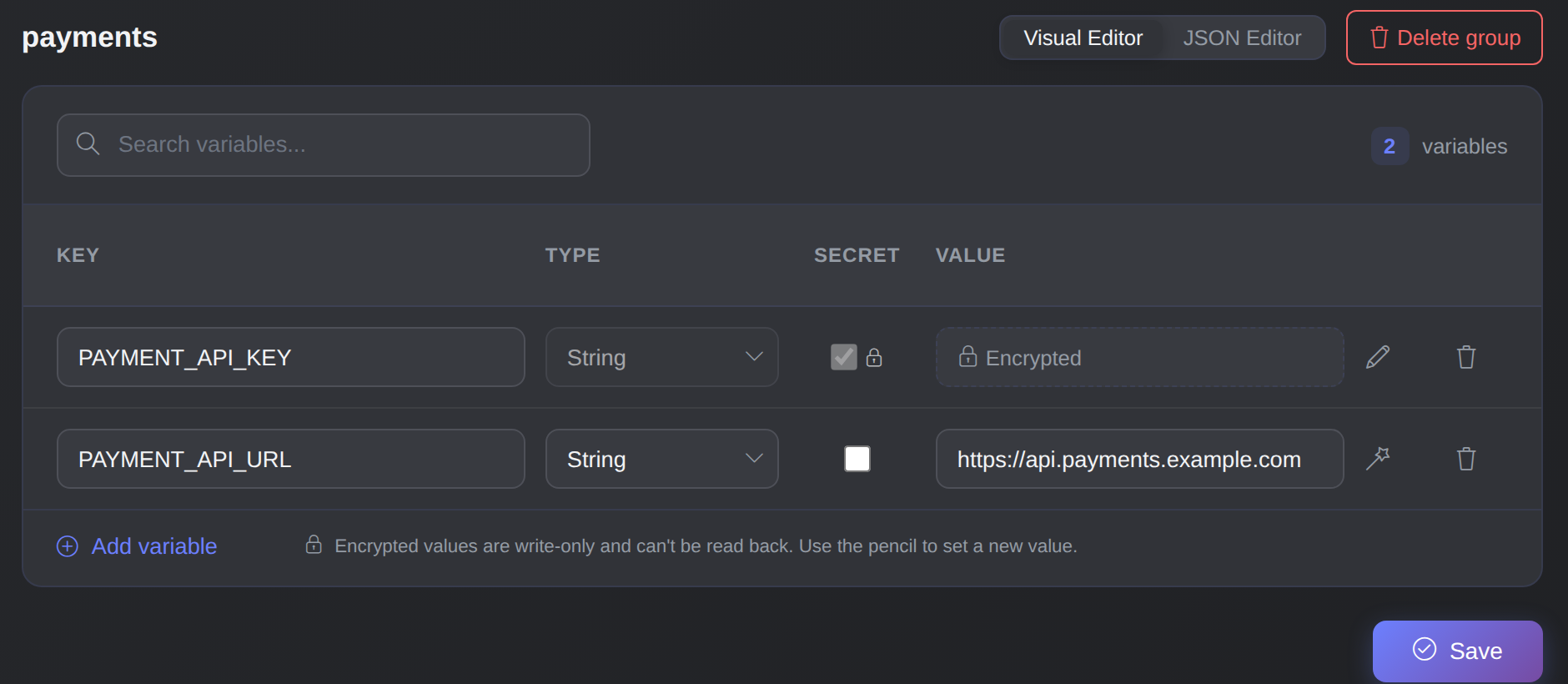
A payments group with a plain URL and an encrypted key. The encrypted value is write-only and shows only as Encrypted.
The important point for your code is who gets them. An encrypted global value reaches a run only when the identity the code runs as (see run identities) holds secrets::read global_env (or secrets::read global_env.<group> for one group's values). Without that, the run still gets the plain values, and the encrypted keys are left out. Check for a key before you use it.
Changing secrets takes manage global_env plus secrets::write global_env, or secrets::write global_env.<group> for a group. Changing plain values needs only the resource's own permission. The full rules, limits and refusals are on the security model page, linked below.
A worked example: payment settings in one group
Say three pieces of code call your payment provider: a platform function that creates checkouts, a component function that records refunds, and a workflow that sends receipts. You create a payments group in the global environment with the provider's base URL and an encrypted API key, and read it where needed:
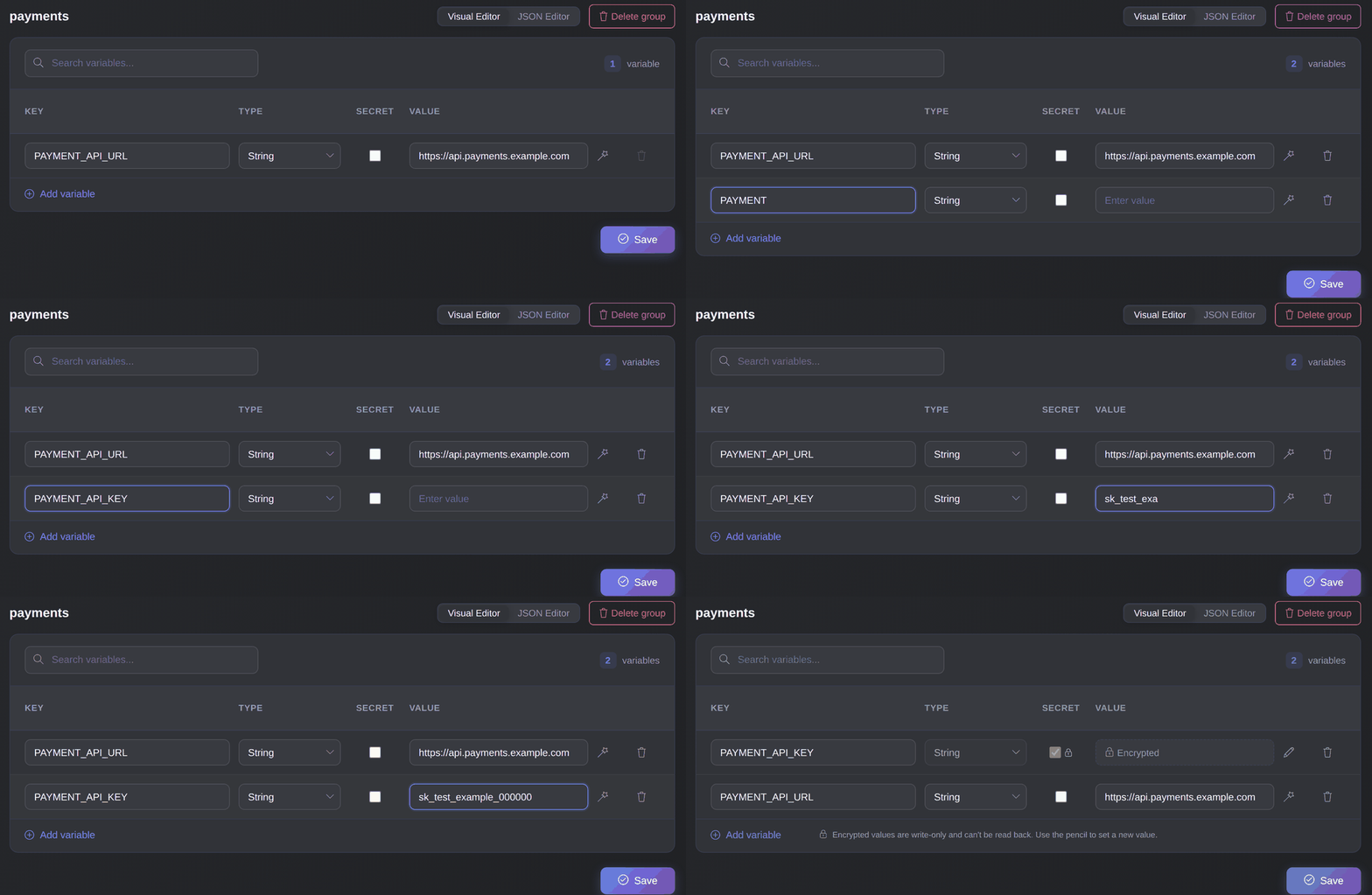
Add the key, mark it Secret and save: the value is stored encrypted and never shown again.
const payments = $globalEnv.group("payments")
const baseUrl = payments.PAYMENT_API_URL
const apiKey = payments.PAYMENT_API_KEY   // left out unless the run identity may read it
When the provider changes its URL, you edit one value. Only identities that hold secrets::read global_env.payments receive the key, and code that doesn't hold that permission still runs with the plain values.